Embed Widget
Sell tickets from your own website. Keep your audience where they are.
Embed a checkout widget on your site with one snippet. Inline iframe, modal overlay, WordPress plugin, or just share a hosted page. Buyers never leave your brand. Revenue goes straight to your Stripe account.
No credit card required. Embeddable widget included on every plan.
Embed options
One event, four ways to sell it
Inline embed
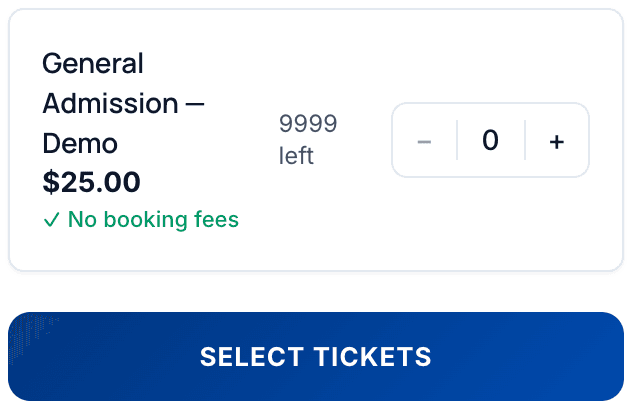
Drop a <script> tag or iframe on any page. The widget renders in place: ticket types, quantities, prices. Buyers pick their tickets on your site and finish checkout in a new tab, with their selection carried over. Works on any platform that allows custom HTML: Squarespace, Wix, Shopify, Webflow, a hand-coded static site, whatever you've got.
Modal overlay
Add the Equaticket script to any button on your page with a data-eq-event-id attribute. One click opens a centered overlay (desktop) or bottom sheet (mobile) with the full checkout flow. Stripe payment opens in a new tab (required by Stripe's framing policy), then the confirmation fires back to your page. No dependencies, vanilla JS, no build step.
WordPress plugin
Install the Equaticket plugin from the WordPress plugin directory. Use the [equaticket] shortcode or the block to embed tickets on any page or post. Supports both inline and modal modes. No code required: paste your event slug for an inline widget, or your event ID for a modal button.
Hosted event page
Don't have a website? Every event gets a hosted page at equaticket.com/e/your-event-slug with your branding, colors, and logo. Share the link directly. Good for social media, email campaigns, or as a fallback when the embed isn't practical.
How it works
Three lines of code to your first embedded sale
Create your event
Set up ticket types, pricing, and branding in the dashboard. Takes about five minutes.
Copy the embed snippet
The dashboard shows inline and modal snippets for every event, and the ready-made WordPress shortcodes. Copy the one you want.
Paste and sell
Add the snippet to your page. The widget loads, buyers purchase, and revenue goes straight to your Stripe account. No redirect, no marketplace, no intermediary.
Analytics
Track every step of the funnel
The embed widget fires postMessage events at each stage of the buyer journey:
eq:ticket_addeda buyer adds a ticket to their selection
eq:checkout_starteda buyer begins the checkout flow
eq:purchase_completea purchase is confirmed
These events bubble up from the widget iframe to your parent page, where you can capture them with a small JavaScript listener. Map them to Google Analytics 4, Meta Pixel, Google Tag Manager, or any analytics tool that accepts custom events. A ready-made companion snippet is included in the documentation.
This works across all embed modes (inline, modal, and WordPress), so your conversion data is consistent regardless of how you embedded.
Your brand
Attendees see your brand, not ours
Your logo and colors
Branding is configured per-organization in the dashboard. The embed widget, hosted page, and ticket emails all reflect your visual identity.
"Powered by Equaticket" removal
On paid plans, the small Equaticket attribution is removed from the embed widget and checkout modal. Your checkout looks like yours.
BYO email domain
On every plan, including Free, connect your own Resend sending domain so ticket confirmations, reminders, and order emails come from a noreply@ address on your own domain (for example noreply@mail.yourvenue.com), not noreply@mail.equaticket.com.
Integrations
Works where your site lives
| Platform | How | Status |
|---|---|---|
| Any HTML site | Inline <script> tag or iframe | Available |
| WordPress | Plugin (shortcode + Gutenberg block) | Available |
| Squarespace | Native extension (inline, modal, button link) | Pending approval |
| Wix | Native app (Wix Blocks) | Pending approval |
| Shopify | Manual embed via custom HTML block | Docs provided |
| Webflow | Manual embed via custom code block | Docs provided |
Squarespace and Wix native integrations are submitted and under review. In the meantime, manual embed via custom HTML works on both platforms.
Savings calculator
See how much you'd save selling from your own site
Most platforms that offer embeddable widgets charge per-ticket fees on top. Equaticket's embed is included on every plan. Your only cost is the flat subscription.
= 210 tickets every 3 months.
- Biggest savingsEventbrite$4,083/year
in total ticketing fees
Save $2,386/yearwith Equaticket vs. Eventbrite
- TicketSpice$2,180/year
in total ticketing fees
Save $484/yearwith Equaticket vs. TicketSpice
- Ticket Tailor$2,062/year
in total ticketing fees
Save $366/yearwith Equaticket vs. Ticket Tailor
Total Savings
$366 – $2,386/year
or $1,830 – $11,932 over 5 years
30-day money-back guarantee. Available once per organization within 30 days of starting a paid subscription. A refund ends your paid plan immediately and may pause future paid events. See the guarantee terms.
Calculations based on total fees. All platforms include payment processing via Stripe (2.9% + $0.30 per transaction) unless otherwise noted. Eventbrite bundles processing into their fee. Equaticket subscription billed monthly on a 3-month minimum. Competitor pricing verified July 2026. Sales tax and organizer-added fees can change a checkout total.



Your site. Your checkout. Your revenue.
Embed tickets anywhere with one snippet. No per-ticket fees, no redirects to a marketplace, no sharing your audience. Funds go straight to your Stripe account.
Start freeNo credit card required. No per-ticket fees.